J2ee 3mark Question-Answer 2017
J2EE :- 3 Mark Question - Answer October-2017
Q-1 Explain type of web container
A web container (also known as a servlet container) is a component of a web server that interacts with Java servlets and Java Server Pages (JSP) to handle requests from clients. It manages the lifecycle, security, concurrency, and deployment of servlets and JSPs. The web container is responsible for handling HTTP requests and responses and provides an environment in which web components can execute.
Types of Web Containers in J2EE:
[1] Servlet Container :
This is the most basic form of a web container, which manages the execution of servlets. A servlet is a Java class that handles requests and generates dynamic responses (usually in HTML). The servlet container is responsible for instantiating, initializing, and invoking servlets.
Examples: Apache Tomcat, Jetty
[2] JSP Container :
JSP (Java Server Pages) is another type of web component managed by the web container. A JSP container is part of the web container that processes JSP files. JSP pages are compiled into servlets by the container, and then the servlet container manages the execution of these servlets.
Examples: JSP support in Apache Tomcat, GlassFish
[3] Enterprise Web Container :
This type of web container is typically found in full-fledged J2EE application servers. It provides additional features beyond standard servlet and JSP processing, such as integration with EJB (Enterprise JavaBeans), JNDI (Java Naming and Directory Interface), and JMS (Java Message Service).
Examples: Web containers in application servers like IBM WebSphere, Oracle WebLogic, JBoss.
Q-2 Describe validate() and reset() methods
The validate() and reset() methods are commonly used in Java web applications, particularly within the context of the Apache Struts framework, a popular Java framework for building web applications. These methods are typically associated with form handling and are used to manage user input and ensure data integrity.
1. validate() Method
Purpose: The validate() method is used to check the validity of the data submitted by the user in a form before the application processes it. This method ensures that the data meets the required constraints and conditions, such as non-null values, correct formats (e.g., valid email addresses), and acceptable value ranges.
Usage:
The validate() method is usually defined in an ActionForm class in a Struts application. When a form is submitted, the framework automatically calls this method.
2. reset() Method
Purpose: The reset() method is used to reset the properties of an ActionForm to their default values before the new set of values from the current HTTP request is populated. This ensures that the form is initialized properly each time it is displayed or processed, preventing leftover data from previous requests from being used.
Usage:
The reset() method is automatically called by the Struts framework before populating the ActionForm with data from the request.
Q-3 Explain different types of beans
Beans refer to components that encapsulate business logic, manage state, and interact with databases or other services. The most prominent types of beans in J2EE are Enterprise JavaBeans (EJBs), which are server-side components that provide reusable business logic. There are different types of beans in the EJB framework, each serving a specific purpose.
Types of Beans in J2EE:
1. Session Beans :
Purpose: Handle business logic and can be stateful or stateless, depending on whether they maintain a conversational state with the client.
Types : (i)Stateless Session Beans
(ii)Stateful Session Beans
(iii)Singleton Session Beans
2. Entity Beans :
Purpose: Represent persistent data stored in a database. Each entity bean instance corresponds to a row in a database table.
Types : (i)Container-Managed Persistence (CMP):
(ii)Bean-Managed Persistence (BMP):
3. Message-Driven Beans (MDBs):
Purpose: Handle asynchronous messaging, usually via Java Message Service (JMS). MDBs listen to a message queue or topic and process messages independently of any client interaction.
Example Use: Processing messages from a queue that collects customer orders placed via a website.
Q-4 Explain Database metadata
- A MetaData means data about data.
Generally, Data about data is known as metadata. The database metadata interface provides methods to get information about the database you have connected with like, database name, database driver version, maximum column length etc...
- This class is coming from java.sql.* packages.
To create the object of database metadata :
DatabaseMetaData dmd;
To initialize the database meta data object :
dmd=con.getMetaData();
methods :
getDriverName() :- it returns the name of the JDBC driver.
getDriverVersion() :- it returns the version number of the JDBC driver.
getUserName() :- it returns the username of the database.
getDatabaseProductName() :- it returns the product name of the database.
getDatabaseProductVersion() :- it returns the product version of the database.
getURL() :- it returns the original URL passed to .
Q-5 Explain life cycle of servlet
The web container maintains the life cycle of a servlet instance. Let's see the life cycle of the servlet:
1) Servlet class is loaded.
2) Servlet instance is created.
3) init method is invoked.
4) service method is invoked.
5) destroy method is invoked.

1) Servlet class is loaded.
The classloader is responsible to load the servlet class. The servlet class is loaded when the first request for the servlet is received by the web container.
2) Servlet instance is created
The web container creates the instance of a servlet after loading the servlet class. The servlet instance is created only once in the servlet life cycle.
3) init method is invoked
The web container calls the init method only once after creating the servlet instance. The init method is used to initialize the servlet. It is the life cycle method of the javax.servlet.Servlet interface. Syntax of the init method is given below:
Syntax : public void init(ServletConfig config) throws ServletException
4) service method is invoked
The web container calls the service method each time when request for the servlet is received. If servlet is not initialized, it follows the first three steps as described above then calls the service method. If servlet is initialized, it calls the service method. Notice that servlet is initialized only once. The syntax of the service method of the Servlet interface is given below:
Syntax: public void service(ServletRequest request, ServletResponse response)
throws ServletException, IOException
5) destroy method is invoked
The web container calls the destroy method before removing the servlet instance from the service. It gives the servlet an opportunity to clean up any resource for example memory, thread etc. The syntax of the destroy method of the Servlet interface is given below:
Syntax : public void destroy()
Q-6 what are the classes used in struts ?
In Java 2 Platform, Enterprise Edition (J2EE), Struts serves as a framework for building web applications based on the MVC (Model-View-Controller) architecture. Over time, Struts evolved from Struts 1.x to Struts 2.x, with several changes in class structure. Below are key classes used in both Struts 1.x and Struts 2.x:
Struts 1.x (based on J2EE)
1. Action: Represents the controller component. This class contains the business logic and is invoked when an HTTP request is received. It processes the request and returns an ActionForward object to determine the next view to display.
2. ActionForm: A form bean that holds user data input. It is used to capture and validate data coming from the client before passing it to the Action class.
3. ActionForward: Represents a destination to which the Action class forwards the control. It can be a JSP page or another Action.
4. ActionMapping: Defines the mapping between the URL and the Action class, along with associated configuration parameters like form beans, forwards, etc.
5. ActionServlet: The main controller servlet responsible for processing all incoming HTTP requests. It acts as a front controller, delegating requests to Action classes.
6. RequestProcessor: Handles the processing of the HTTP requests. It parses the incoming request, selects the appropriate Action, invokes it, and forwards the response to the appropriate view.
7. ActionErrors / ActionMessages: These classes are used to store and manage error or informational messages that can be displayed in the view layer.
8. DynaActionForm: A dynamic form bean used to handle forms without creating explicit ActionForm classes for each form. Instead, form properties are specified in the configuration file (struts-config.xml).
9. ModuleConfig: Represents a Struts configuration module, typically defined in struts-config.xml. It holds settings such as ActionMappings, form beans, and forwards.
10. ActionContext: This holds all the context for the current user request, such as session data, request attributes, and parameter values.
------------------------------------------------------------------------------------------------------------------------
Q-1 Explain AOP Terminologies
Aspect oriented Programming(AOP) is a programming technique that allows programmers to separate program logic into parts called concerns .
- Aspect : The key unit of modularity in AOP, representing a concern that cuts across multiple classes. For example, an aspect for logging can be applied across various methods in different classes.
- Advice : This is the action taken by an aspect at a particular join point. There are five types of advice:
- Before : Executed before the method call.
- After : Executed after the method call, regardless of its outcome.
- AfterReturning : Executed after the method returns a result, but not if an exception occurs.
- Around : Surrounds the method execution, allowing you to control the method execution and its result.
- AfterThrowing : Executed if the method throws an exception.

- join point : A specific point in the execution of a program, such as method execution or exception handling, where an aspect can be applied.
- pointcut : A predicate that matches join points. A pointcut expression specifies where an advice should be applied.
- weaving : The process of linking aspects with the target object. Weaving can occur at compile-time, load-time, or runtime. Spring AOP performs runtime weaving using proxy-based mechanisms.
Q-2 Briefly explain message driven beans
MDB asynchronously receives the message and processes it.
A message driven bean receives message from queue or topic, so you must have the knowledge of JMS API.
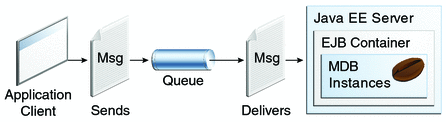
Example Use: Processing messages from a queue that collects customer orders placed via a website.
Difference Between Session and Cookies
Cookies | Session |
|---|---|
| Cookies are client-side files on a local computer that hold user information. | Sessions are server-side files that contain user data. |
| Cookies end on the lifetime set by the user. | When the user quits the browser or logs out of the programmed, the session is over. |
| It can only store a certain amount of info. | It can hold an indefinite quantity of data. |
| The browser’s cookies have a maximum capacity of 4 KB. | We can keep as much data as we like within a session, however there is a maximum memory restriction of 128 MB that a script may consume at one time. |
| Because cookies are kept on the local computer, we don’t need to run a function to start them. | To begin the session, we must use the session start() method. |
| Cookies are not secured. | Session are more secured compare than cookies. |
| Cookies stored data in text file. | Session save data in encrypted form. |
| Cookies stored on a limited data. | Session stored a unlimited data. |
| In PHP, to get the data from Cookies , $_COOKIES the global variable is used | In PHP , to get the data from Session, $_SESSION the global variable is used |
| We can set an expiration date to delete the cookie’s data. It will automatically delete the data at that specific time. | In PHP, to destroy or remove the data stored within a session, we can use the session_destroy() function, and to unset a specific variable, we can use the unset() function. |

Comments
Post a Comment